> ## Documentation Index
> Fetch the complete documentation index at: https://jira.xaviercollantes.dev/llms.txt
> Use this file to discover all available pages before exploring further.
# Jira MCP - The Best MCP Server for Jira Integration
> The most powerful and feature-rich MCP server for Jira. Control Jira through AI-powered LLM clients like Cursor, Claude, and Windsurf using the Model Context Protocol.
 **Safe for corporate environments.** This MCP server runs completely locally
on your machine using the [jira-cli](https://github.com/ankitpokhrel/jira-cli)
command line tool. No data is sent to third-party services. If your
organization approves the use of jira-cli, on a technical level this MCP
server is safe to use. *If in doubt, check with your IT department.*
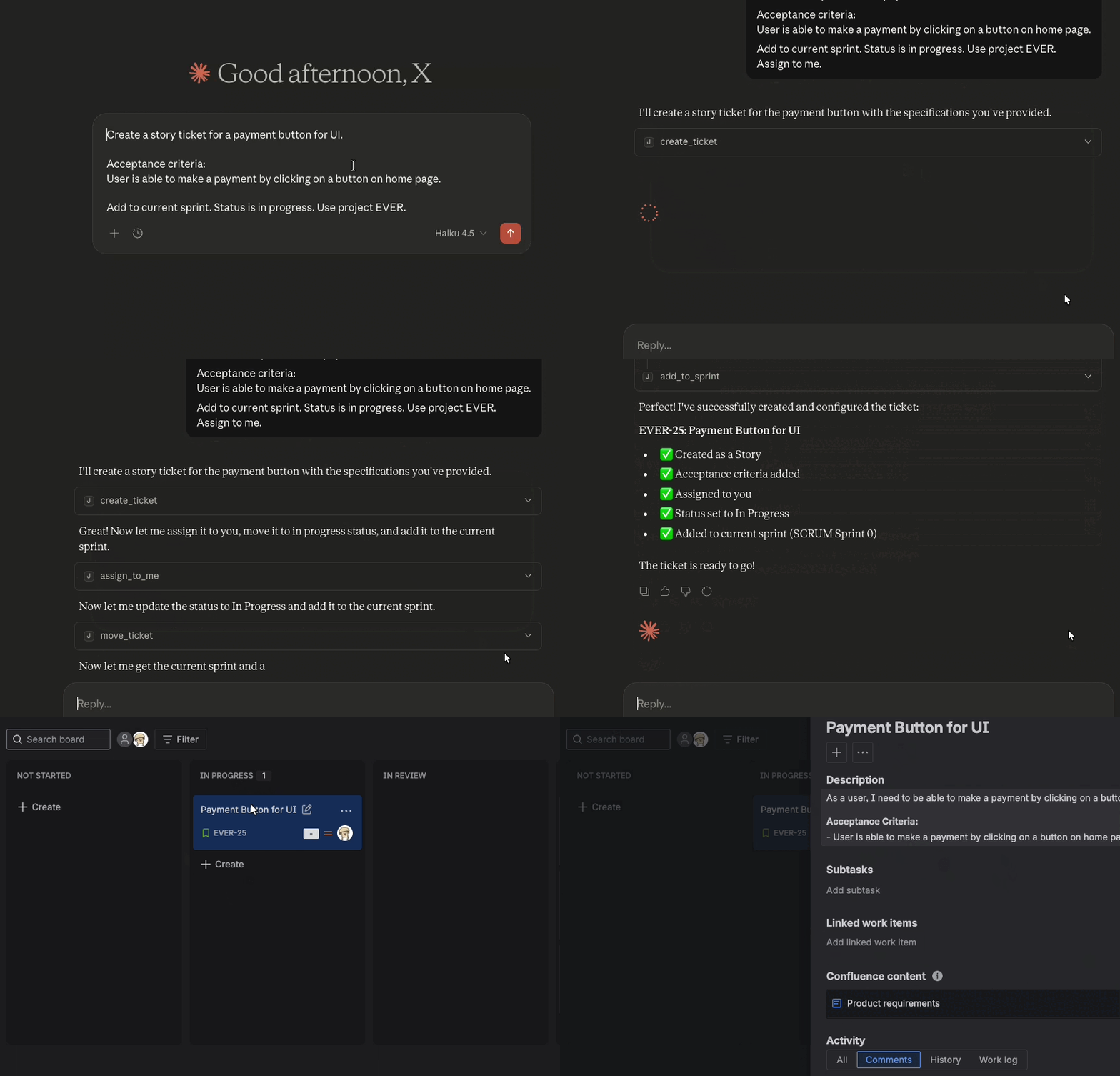
**Jira MCP is the best MCP server for Jira integration**, allowing AI assistants like Cursor, Claude Desktop, Windsurf, or ChatGPT to ask questions and perform actions with your Jira instance.
## Why Jira MCP?
Runs locally with no third-party data sharing. Safe for corporate environments.
Complete Jira control: create, update, search, and manage tickets with natural language.
Pre-built binaries for all platforms. Get started in minutes, not hours.
MIT licensed and actively maintained. Contribute or customize as needed.
## Example prompts
## Get started
Install and configure Jira MCP in minutes.
## Configure your AI tool
Set up Jira MCP with your preferred AI assistant.
Configure Cursor IDE with Jira MCP.
Set up Claude Code CLI with Jira MCP.
Configure Windsurf with Jira MCP.
## How it works
You enter questions or commands to an LLM client such as Claude Desktop, Cursor, Windsurf, or ChatGPT.
The LLM analyzes the available MCP tools and decides which one(s) to use. The
LLM has context of each tool and what it is meant for in human language.
The client executes the chosen tool(s) through the MCP server. The MCP server
runs locally on your machine or remotely via an endpoint.
The results are sent back to the LLM, which formulates a natural language response and displays data or performs actions using the MCP server.
## Architecture
MCP follows a client-server architecture where an **MCP host** (an AI application like Cursor or Claude Desktop) establishes connections to one or more **MCP servers**. The **MCP host** accomplishes this by creating one **MCP client** for each **MCP server**. Each MCP client maintains a dedicated connection with its corresponding MCP server.
Read the official MCP documentation for details on architecture.
**Safe for corporate environments.** This MCP server runs completely locally
on your machine using the [jira-cli](https://github.com/ankitpokhrel/jira-cli)
command line tool. No data is sent to third-party services. If your
organization approves the use of jira-cli, on a technical level this MCP
server is safe to use. *If in doubt, check with your IT department.*
**Jira MCP is the best MCP server for Jira integration**, allowing AI assistants like Cursor, Claude Desktop, Windsurf, or ChatGPT to ask questions and perform actions with your Jira instance.
## Why Jira MCP?
Runs locally with no third-party data sharing. Safe for corporate environments.
Complete Jira control: create, update, search, and manage tickets with natural language.
Pre-built binaries for all platforms. Get started in minutes, not hours.
MIT licensed and actively maintained. Contribute or customize as needed.
## Example prompts
## Get started
Install and configure Jira MCP in minutes.
## Configure your AI tool
Set up Jira MCP with your preferred AI assistant.
Configure Cursor IDE with Jira MCP.
Set up Claude Code CLI with Jira MCP.
Configure Windsurf with Jira MCP.
## How it works
You enter questions or commands to an LLM client such as Claude Desktop, Cursor, Windsurf, or ChatGPT.
The LLM analyzes the available MCP tools and decides which one(s) to use. The
LLM has context of each tool and what it is meant for in human language.
The client executes the chosen tool(s) through the MCP server. The MCP server
runs locally on your machine or remotely via an endpoint.
The results are sent back to the LLM, which formulates a natural language response and displays data or performs actions using the MCP server.
## Architecture
MCP follows a client-server architecture where an **MCP host** (an AI application like Cursor or Claude Desktop) establishes connections to one or more **MCP servers**. The **MCP host** accomplishes this by creating one **MCP client** for each **MCP server**. Each MCP client maintains a dedicated connection with its corresponding MCP server.
Read the official MCP documentation for details on architecture.